Nonlinear Elements - Introduction
Time simulations can be done irrespective of whether they contain linear or nonlinear elements.. This is in contrast to the frequency simulation where you may only have linear elements (including discrete time elements).
The most important nonlinear functions are available as their own elements. With multi-function elements you can develop numerous additional, frequently used transfer functions. If you cannot find the proper function, try to combine standard elements or use the user characteristic element with which you can develop any characteristic.
Input and output shift
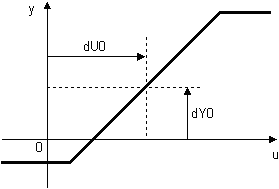
The characteristic of many nonlinear elements can be shifted in the coordinate system. The characteristic is shifted to the right by a constant value subtracted from the input signal. The characteristic is shifted upwards by a constant value added to the output signal. The parameters of the input and output shift are not shown below the block symbol in the drawing if they are equal to zero. You can edit them in the simulation properties dialog box of the corresponding blocks.
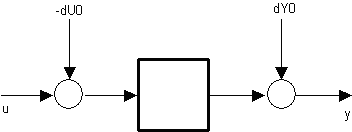
Example: The saturation characteristic is shifted by dU0 and dY0