User Source
This characteristic consists of a series of points that form the output signal. You can select between a linear and a rectangular interpolation.
Function: y(t) = f[P 1...P n, t]
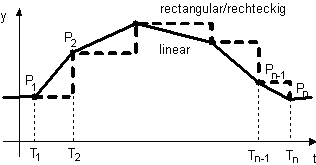
The characteristic can start with an initial value or the first point. The initial value is set by inserting a fictitious first point for time < zero. The data value of this point applies from the very beginning up to the expiration of the start delay. After the start delay has elapsed, the value of the first real point is applied. If there is no fictitious point, the first real point applies from the beginning (before and after the start delay). The start delay shifts the whole characteristic to the right on the time axis. E.g., a point at time 2s comes at time 3s if the start delay is 1s.
Steps are achieved by setting same time for two adjacent points. The law of causality must be observed, therefore the points must be arranged in ascending time. If three or more points have the same time, only the first and the last one are considered.
By setting the option Iterative the characteristic is continuously repeated. If the first point is at time 0, the characteristic starts its repetitions at second point, since the last pulse has priority.
The values are stored in the source, but can also be saved and reloaded to/from a text file.
Description of the data format in the text file:
-
One Y-t pair per line.
-
Y- and t-values must be separated by space, tab or semicolon. Valid decimal separators are point and comma. A data line may be completed by a comment, preceded by asterisk (*).
-
All lines not starting with numeral, comma or period are interpreted as comments.
-
The file must be an ANSI or ASCII text file. Default name extension is .txt, but all other valid Windows extensions are also accepted. The number of data points is limited to 10,000. Surplus points are ignored on larger files.
If the data are stored in a text file, the value pairs are separated by TAB. The decimal separator depends of the setting in the program options.
Sample file:
| Create by Bruno Buesser, Feb. 27, 2007 |
| This file contains 5 pair of values |
| -1; 0.5 *Optional fictitious first point which acts as initial value. |
| 2.45; 1 *That's the first point. Time first then output value |
| 3.67; 2.5 *Second point. The time values must be in ascending order. |
| 5 3.14 *The values are now separated by space |
| (>blank lines are omitted) |
| 6.23 2,5 *Comma is also a valid decimal separator |
| Lines which do not start by numeral, point or comma are skipped |
| 8;0 *That is the last pair of values |
| * 5 pairs are red >> asterisk * is mandatory as the comment starts with a numeral |
| End of sample file |